LDAP Server
How to use goshs as an LDAP server
goshs can act as a rogue LDAP server. Any client that connects and authenticates — whether it sends a plaintext DN/password bind, a SASL PLAIN credential, or an NTLM handshake — will have those credentials captured and displayed in real time in the goshs web UI.
This is useful for:
- Coercing Windows clients or services into authenticating against your server (e.g., via relay or misconfiguration)
- Exploiting Log4Shell (CVE-2021-44228) and similar JNDI injection vulnerabilities
- Capturing LDAP bind credentials from misconfigured applications and appliances
Starting the LDAP server
This starts an LDAP listener on port 389 (default).
Info
Port 389 is a privileged port on Linux. Either run goshs as root, use -u to drop privileges after binding, or change the port with -ldap-port.
LDAP server options
Info
You can use -s with -ss or -sc/-sk to activate LDAPS and spawn on Port 636 if not defined otherwise using ldap-port.
Credential capture
Cleartext bind credentials
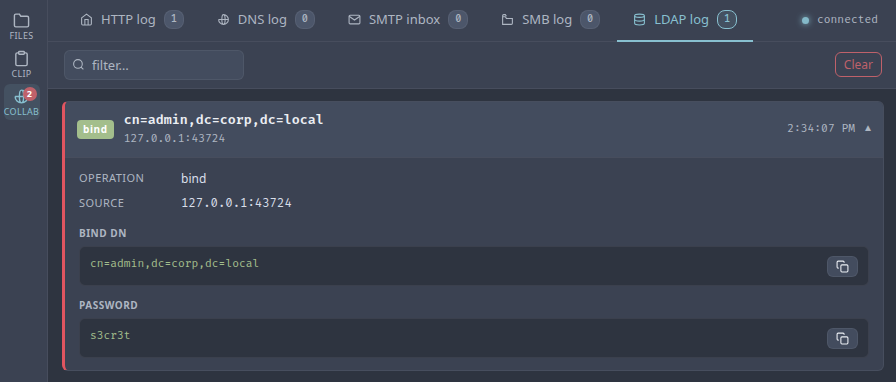
When a client performs a simple LDAP bind (e.g., an application login, ldapsearch, or ldap3 in Python), goshs captures the bind DN and password and broadcasts them to the web UI immediately.
NTLM authentication
Windows clients and many enterprise applications prefer NTLM over cleartext. goshs fully implements the two-leg NTLM challenge/response exchange:
- The client sends an NTLM Negotiate (Type 1) message.
- goshs replies with a crafted NTLM Challenge (Type 2), forcing NTLMv2.
- The client replies with an NTLM Authenticate (Type 3) message.
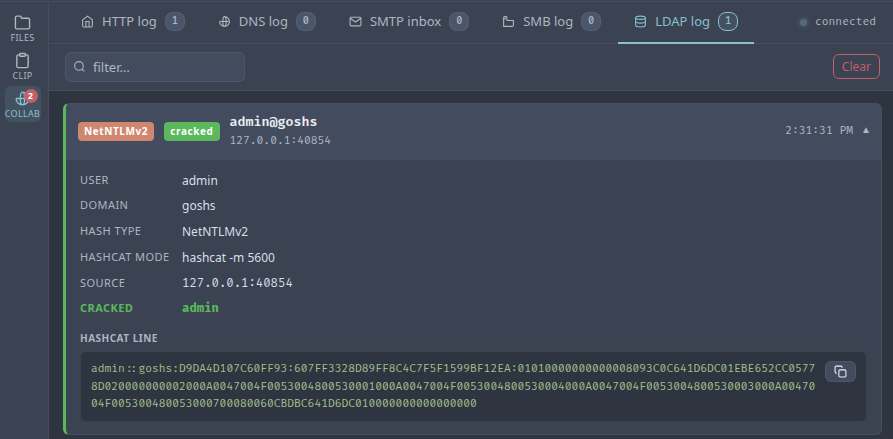
- goshs extracts and logs the NTLMv2 hash in Hashcat-compatible format.
The hash line is printed to stdout and displayed in the web UI.
Quick hash cracking
goshs immediately tries the captured hash against a built-in list of common and username/domain-derived passwords — the same wordlist used by the SMB server. If a match is found it is shown alongside the hash in the web UI with a cracked badge.
For larger wordlists, pass a file path with -ldap-wordlist. goshs will stream the file in the background so the response to the client is not delayed:
When the background crack succeeds, the result is pushed to the web UI as a follow-up event.
Warning
Only use this feature against systems you are authorized to test. Capturing LDAP credentials or NTLM hashes without authorization is illegal in most jurisdictions.
JNDI mode (Log4Shell / CVE-2021-44228)
In JNDI mode, goshs responds to any LDAP search request by returning an entry that redirects the client to a remote Java class (codeBase). The baseDN from the search request becomes the class name in the response, exactly as Log4Shell payloads expect.
A typical Log4Shell payload that would trigger a lookup against goshs:
Tip
When no -ldap-jndi-base is given, the codeBase is automatically set to the goshs HTTP server address and port. Serve your .class file as a static file through goshs and the whole chain runs from a single binary.
Live events via WebSocket
All LDAP events are broadcast in real time to the goshs WebSocket hub and displayed in the Collaborator tab:
| Event type | What is captured |
|---|---|
bind |
Bind DN and plaintext password |
ntlm |
Username, domain, Hashcat hash line, cracked password (if found) |
search |
Base DN (useful in JNDI mode to see what class the target tried to load) |
Webhook notifications
LDAP capture events can be forwarded to your webhook provider:
Use -We ldap to receive only LDAP events, or -We all to include them alongside all other event types.